
Volley vs Feedbucket
Looking for a Feedbucket alternative?
Feedbucket is a feedback widget for web agencies. Clients report issues on the site, and the feedback goes to the project tools the agency already uses, with status kept in sync. It has two self-serve plans, Pro for 2 team members and Business for 25, both with unlimited projects.
Below: what Feedbucket and Volley cost for teams of 3, 10 and 25, and where Volley is different. Prices checked November 2026.
What Feedbucket and Volley cost for your team
List prices in US dollars, billed monthly. Each cell is the cheapest plan with a published price that includes that many team members, the people who sign in to manage feedback.
| Team | Volley | Feedbucket |
|---|---|---|
| 3 people | $29 a monthVolley ProUp to 10 members25 active projects | $89 a monthBusinessUp to 25 team membersUnlimited projects |
| 10 people | $29 a monthVolley ProUp to 10 members25 active projects | $89 a monthBusinessUp to 25 team membersUnlimited projects |
| 25 people | $59 a monthVolley TeamUp to 25 members100 active projects | $89 a monthBusinessUp to 25 team membersUnlimited projects |
- Feedbucket lists no added members on Pro, so 3 or more people need Business.
- Client reporters are unlimited and need no account.
- Feedbucket says yearly billing saves 20% but prints no yearly price, so none is shown here.
Feedbucket prices checked November 2026 on Feedbucket’s pricing page. Volley prices from Volley’s pricing. Plans sold only by quote are left out.
Where Volley is different
Web Canvas
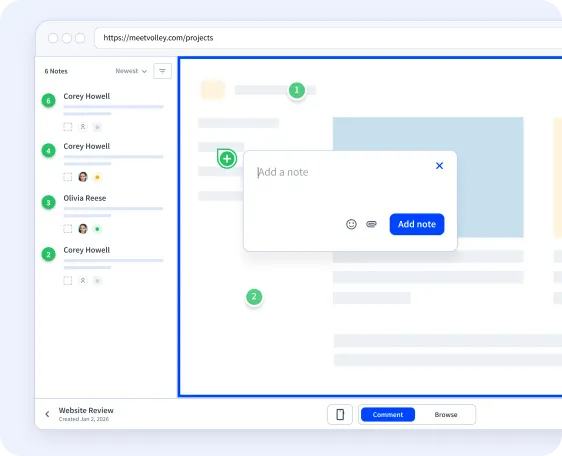
Review any website from a link
Enter a website’s address and Volley opens the live site as a Web Canvas. Share the link: clients and teammates comment right on the page, pinned to the element they mean, and each note saves a screenshot.
- Guests can add their name and email. Nothing to install, no account to create.
- Guests reply, attach images and set status, priority and assignee.
- Check desktop, tablet and mobile widths, or set your own.
- Share with anyone who has the link or with members only, add a password, or pause guest comments.
Widget and browser extension
For staging builds, web apps and pages behind a login
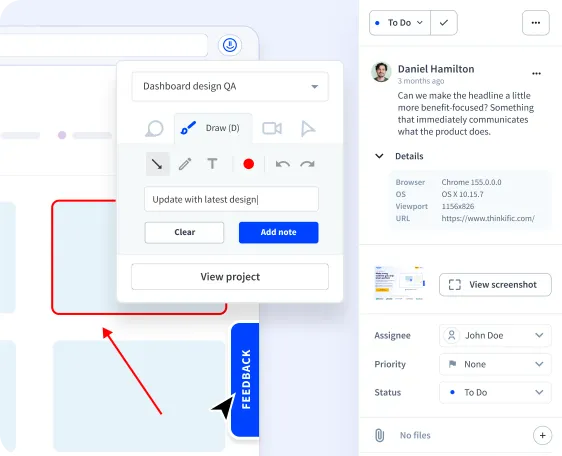
Add the Volley widget to a site, or use the browser extension for Chrome and Firefox, to leave feedback where a shared link cannot reach.
- Annotated screenshots: arrows, drawing and text.
- Screen recordings of up to 5 minutes.
- Browser, operating system, viewport and page address saved with each note.
- Status, priority, assignees and threaded comments in an inbox or board view.
- Notes sent to Jira, Trello, Linear, ClickUp, or Notion, and posted in Slack.
Compared with Feedbucket
- Volley works with Jira, Trello, Linear, ClickUp, and Notion: each new note becomes an item in the one you choose, automatically or when you export it, and can be posted in a Slack channel.
- Volley’s integrations send notes one way; status changes in Jira, Trello, Linear, ClickUp, and Notion do not flow back to Volley.
- Feedbucket starts with one line of JavaScript or a plugin on the site. Volley can start with no change to the site: a Web Canvas opens it from its address.
- The Volley browser extension lets your own team leave feedback on any page without a script on it.
Volley Pro
$29 a monthor $276 a year
- Up to 10 members
- Free guests on Web Canvas and the widget
- 25 active projects
- Web Canvas, widget and browser extension
Volley Team
$59 a monthor $552 a year
- Up to 25 members
- Free guests on Web Canvas and the widget
- 100 active projects
- Web Canvas, widget and browser extension
Volley Unlimited
$199 a monthor $1,872 a year
- No cap on members
- Free guests on Web Canvas and the widget
- Unlimited projects
- Web Canvas, widget and browser extension
7-day free trial. See everything in each plan.
Pick Volley if
You want clients reviewing a site from a link before anything is installed on it, and the team prices in the table above suit you.
Questions about Feedbucket alternatives
How do Volley and Feedbucket prices compare?
Do Feedbucket reporters need an account?
How do you install Feedbucket?
Does Feedbucket have video feedback?
What Volley customers say

Amazing tool for my clients make reviews of my websites!

Where were you my whole life? Seriously there are plenty of tools to assist with client feedback but Volley is so simple for my clients to use that it actually gets used. Sure, I wish there were a couple more bells and whistles but I think the simplicity allows my most technically challenged clients to use the tool. It is now my goto custom collaboration tool.

It's a tool that is the missing piece for website design/dev communication.
Try Volley on your next website review
Create a Web Canvas, share the link, and see the feedback land on the page.