
Volley vs Pastel
Looking for a Pastel alternative?
Pastel lets people comment on a live website through a link, with no install for reviewers. Its FAQ says it layers comments on the live site with a proxy rather than copying it. Plans are priced by users and canvases, from a free plan with 1 user and 1 canvas to Team, which starts at 5 users.
Below: what Pastel and Volley cost for teams of 3, 10 and 25, and where Volley is different. Prices checked November 2026.
What Pastel and Volley cost for your team
List prices in US dollars, billed monthly. Each cell is the cheapest plan with a published price that includes that many team members, the people who sign in to manage feedback.
| Team | Volley | Pastel |
|---|---|---|
| 3 people | $29 a monthVolley ProUp to 10 members25 active projects | $119 a monthTeamUp to 5 team membersUnlimited canvases |
| 10 people | $29 a monthVolley ProUp to 10 members25 active projects | $239 a monthTeam5 included, plus 5 at $24 eachUnlimited canvases |
| 25 people | $59 a monthVolley TeamUp to 25 members100 active projects | $599 a monthTeam5 included, plus 20 at $24 eachUnlimited canvases |
- Pro has 2 users and Pastel lists no added users on it, so 3 or more people need Team, which adds users at $24 each.
- Reviewers, comments and views are unlimited on every plan.
- Pastel’s Enterprise plan is $450 a month, billed yearly, from 10 users; its price for more users is not published, so it is left out here.
- Paying yearly, Pastel lists Pro at $29 and Team at $99 a month.
Pastel prices checked November 2026 on Pastel’s pricing page. Volley prices from Volley’s pricing. Plans sold only by quote are left out.
Where Volley is different
Web Canvas
Review any website from a link
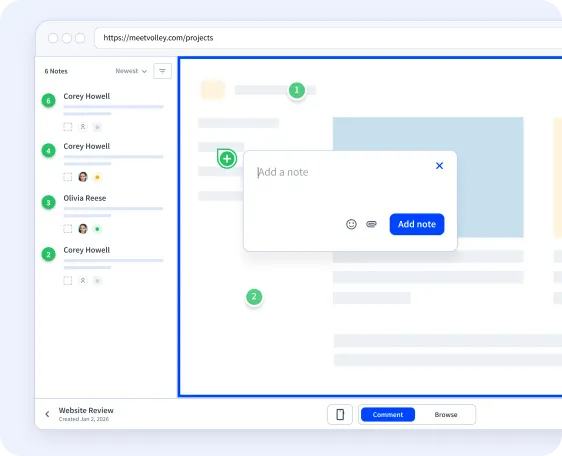
Enter a website’s address and Volley opens the live site as a Web Canvas. Share the link: clients and teammates comment right on the page, pinned to the element they mean, and each note saves a screenshot.
- Guests can add their name and email. Nothing to install, no account to create.
- Guests reply, attach images and set status, priority and assignee.
- Check desktop, tablet and mobile widths, or set your own.
- Share with anyone who has the link or with members only, add a password, or pause guest comments.
Widget and browser extension
For staging builds, web apps and pages behind a login
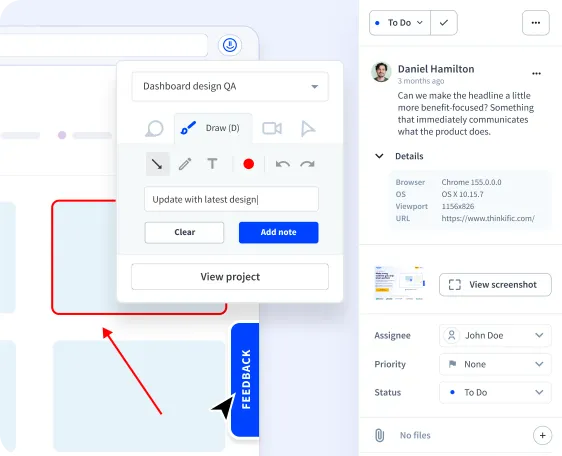
Add the Volley widget to a site, or use the browser extension for Chrome and Firefox, to leave feedback where a shared link cannot reach.
- Annotated screenshots: arrows, drawing and text.
- Screen recordings of up to 5 minutes.
- Browser, operating system, viewport and page address saved with each note.
- Status, priority, assignees and threaded comments in an inbox or board view.
- Notes sent to Jira, Trello, Linear, ClickUp, or Notion, and posted in Slack.
Compared with Pastel
- Volley works with Jira, Trello, Linear, ClickUp, and Notion: each new note becomes an item in the one you choose, automatically or when you export it, and can be posted in a Slack channel.
- Both review live sites from a link. Volley adds a widget and a browser extension for what a link cannot reach, such as staging builds and pages behind a login.
- Pastel’s FAQ says guest reviewers can only comment and reply. On a Volley Web Canvas, guests can also set status, priority and assignee.
Volley Pro
$29 a monthor $276 a year
- Up to 10 members
- Free guests on Web Canvas and the widget
- 25 active projects
- Web Canvas, widget and browser extension
Volley Team
$59 a monthor $552 a year
- Up to 25 members
- Free guests on Web Canvas and the widget
- 100 active projects
- Web Canvas, widget and browser extension
Volley Unlimited
$199 a monthor $1,872 a year
- No cap on members
- Free guests on Web Canvas and the widget
- Unlimited projects
- Web Canvas, widget and browser extension
7-day free trial. See everything in each plan.
Pick Volley if
You want link reviews plus a widget and extension for staging and logged-in pages, and the team prices in the table above suit you.
Questions about Pastel alternatives
How do Volley and Pastel prices compare?
Is Volley’s Web Canvas like Pastel?
Does Pastel have a free plan?
How much does an extra Pastel user cost?
What Volley customers say

Quick and Easy.
Often clients are intimidated by new tools. Volley is really easy to install and my clients seem to 'get it'. Volley has been a god-send in getting tech challenged clients to stick to our processes. No more screen shots in a word doc.

Fantastic App. Love how easy it is to leave comments directly on the live site for my designer to review. On long scrolling sales pages, this is way easier than figuring out how to take a full-size screenshot and then adding notes to it through a photo editor. Thanks Volley team!

Really easy way to talk to clients about website changes. Love this tool! It does need some improvements but the basic stuff is there and it is already usable. Perfect for a freelance webdev like me!

Try Volley on your next website review
Create a Web Canvas, share the link, and see the feedback land on the page.